BufferView
A BufferView is a templated (generics based) control that displays and edits a byte buffer in a hex-editor style layout. It can show raw data in multiple representations (hexadecimal, octal, binary, integers, floats, or characters), optional address and interval-name columns, and optional character-decoding panels.
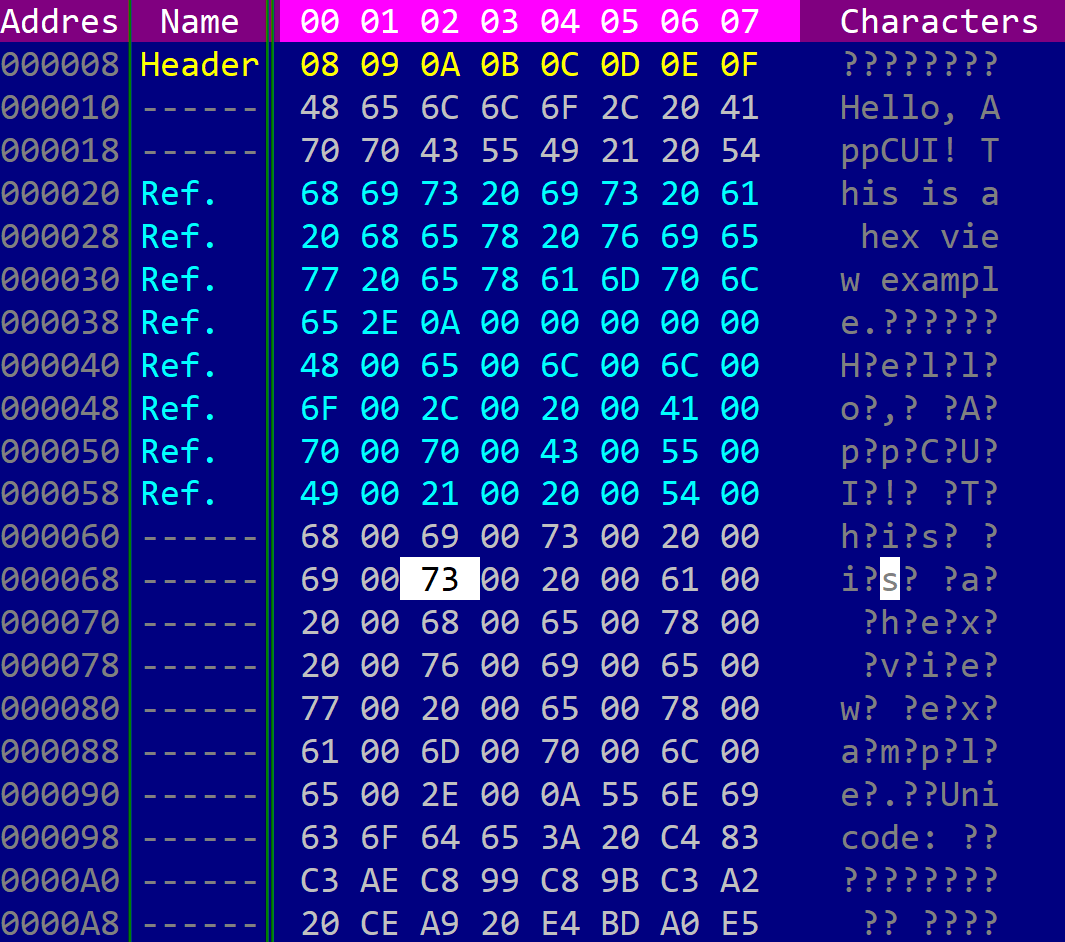
It can be created using BufferView::new(...), BufferView::with_buffer(...), or the bufferview! macro.
let bv1: BufferView<Vec<u8>> = BufferView::new(layout!("..."), bufferview::Flags::None);
let bv2: BufferView<Vec<u8>> = BufferView::with_buffer(vec![1, 2, 3], layout!("..."), bufferview::Flags::ScrollBars);
let bv3 = bufferview!("Vec<u8>, d:f, flags: ScrollBars+ShowAddress+SearchBar, columns: 8, format: Hex, offset: Hex");
let bv4 = bufferview!("Vec<u8>, d:f, flags: ShowAddress+ShowIntervalNames, format: Hex(Word), endian: Little");
where type T is the type of the backing store and must implement the BufferAccess trait. Vec<u8> is provided out of the box.
The bufferview! macro creates the control with a default-constructed backing buffer (T::default()). Load data at runtime with set_buffer or retrieve it with take_buffer.
A bufferview supports all common parameters (as they are described in Instantiate via Macros section). Besides them, the following named parameters are also accepted:
| Parameter name | Type | Positional parameter | Purpose |
|---|---|---|---|
class or type | String | Yes, first positional parameter | The BufferAccess type used as the backing store (for example Vec<u8> or a custom type). |
flags | String | No | BufferView initialization flags. |
lsm or left-scroll-margin | Numeric | No | The left margin of the bottom scroll bar in characters. If not provided the default value is 0. This should be a positive number and it only has an effect if the ScrollBars or SearchBar flags were specified. |
tsm or top-scroll-margin | Numeric | No | The top margin of the right scroll bar in characters. If not provided the default value is 0. This should be a positive number and it only has an effect if the ScrollBars flag was used to create the control. |
offset-format or offset or address-format | String | No | Address column format (Hex or Dec). |
endian | String | No | Byte order for multi-byte numeric values (Little or Big). |
format or data-format or representation | String | No | Data panel format (see Data representation formats). |
columns or columns-count | String | No | Number of data columns per row (Auto, Fixed(N), or an integer from 1 to 255). |
codepage or cp | String | No | Character panel code page (Default, ASCII, CP437, WINDOWS_1252, or a custom name). |
address-width or aw | Numeric | No | Address column width in characters (minimum 1, maximum 24). |
address-name or address | String | No | Address column title (default: Address). |
interval-name-width or inw | Numeric | No | Interval-name column width in characters (minimum 1, maximum 64). |
interval-name-title or interval-title | String | No | Interval-name column title (default: Name). |
intervals | Expression | No | Initial interval definitions passed to set_intervals (for example &[Interval::new(0, 16, CharAttribute::default(), "Header")]). |
selection-start and selection-end | Numeric | No | Initial byte selection range. Both parameters must be provided together. |
A bufferview supports the following initialization flags:
bufferview::Flags::ScrollBarsorScrollBars(for macro initialization) - enables scroll bars for navigating through the buffer. The scroll bars are visible only when the control has focus.bufferview::Flags::SearchBarorSearchBar(for macro initialization) - enables a search bar for finding byte patterns. The search bar is visible only when the control has focus.bufferview::Flags::HideHeaderorHideHeader(for macro initialization) - hides the column header row.bufferview::Flags::ShowAddressorShowAddress(for macro initialization) - shows the address column on the left.bufferview::Flags::ShowIntervalNamesorShowIntervalNames(for macro initialization) - shows the interval-name column.bufferview::Flags::NoPanelDimmingorNoPanelDimming(for macro initialization) - disables dimming of the inactive panel (data or character panel).bufferview::Flags::ShowAsciiStringsorShowAsciiStrings(for macro initialization) - shows the ASCII string panel below the data area.bufferview::Flags::ShowUtf16AsciiStringsorShowUtf16AsciiStrings(for macro initialization) - highlights UTF-16LE ASCII strings in the character panel.bufferview::Flags::DecodeUTF8CharactersorDecodeUTF8Characters(for macro initialization) - decodes UTF-8 sequences in the character panel.bufferview::Flags::ReadOnlyorReadOnly(for macro initialization) - disables in-place editing.bufferview::Flags::TabSwitchesActivePanelorTabSwitchesActivePanel(for macro initialization) - makes theTabkey switch between the data panel and the character panel (instead of leaving the control).
Data representation formats
The main data panel can display buffer contents in several formats. The active format is set via the format macro parameter or with set_data_representation_format.
| Format | Enum value | Description |
|---|---|---|
| Hex (byte) | DataRepresentationFormat::Hex(HexFormat::Byte) or Hex | One byte per column, shown as NN. |
| Hex (word) | DataRepresentationFormat::Hex(HexFormat::Word) or Hex(Word) | Two bytes per column, shown as NNNN. |
| Hex (dword) | DataRepresentationFormat::Hex(HexFormat::DWord) or Hex(DWord) | Four bytes per column. |
| Hex (qword) | DataRepresentationFormat::Hex(HexFormat::QWord) or Hex(QWord) | Eight bytes per column. |
| Octal | DataRepresentationFormat::Oct or Oct | One byte per column in octal. |
| Binary | DataRepresentationFormat::Bin or Bin | One byte per column in binary. |
| Character | DataRepresentationFormat::Char or Char | One byte per column as a raw character. |
| Unsigned integer | DataRepresentationFormat::UInt(UIntFormat::U8) or UInt, UInt(U16), UInt(U32), UInt(U64) | Multi-byte unsigned integers. |
| Signed integer | DataRepresentationFormat::Int(IntFormat::I8) or Int, Int(I16), Int(I32), Int(I64) | Multi-byte signed integers. |
| Float | DataRepresentationFormat::Float(FloatFormat::Scientific32) or Float, Float(Scientific64), Float(E4M3), Float(E5M2) | Floating-point values. |
When a multi-byte format is active, the byte order is controlled by set_endian (Endian::Little or Endian::Big). The address column format is controlled separately via set_offset_format (OffsetFormat::Hex or OffsetFormat::Dec).
The number of columns per row can be fixed or computed automatically to fill the available width:
ColumnsCount::Fixed(N)or macrocolumns: N/columns: Fixed(N)- exactlyNcolumns per row.ColumnsCount::Autoor macrocolumns: Auto- as many columns as fit in the current control width.
BufferAccess
To connect a BufferView to your data, the backing type must implement the bufferview::BufferAccess trait:
pub trait BufferAccess : Default {
    fn count(&self) -> u64;
    fn get(&mut self, pos: u64) -> Option<u8>;
    fn can_write(&self) -> bool;
    fn set(&mut self, pos: u64, value: u8) -> bool;
    fn can_resize(&self) -> bool;
    fn resize(&mut self, new_size: u64, fill_byte: u8) -> bool;
}
countreturns the number of bytes in the buffer.getreads a byte atpos, or returnsNoneif the position is not readable (for example a sparse or memory-mapped region).can_write/setcontrol whether individual bytes can be modified in place.can_resize/resizecontrol whether the buffer length can be changed.
Vec<u8> already implements BufferAccess. For custom sources (files, memory-mapped regions, read-only views, and so on), implement the trait on your own type. The examples/hexview sample shows a MyBuffer wrapper that exposes most bytes but marks a 100-byte region as unreadable.
Editing through the UI is allowed only when the backing buffer reports can_write() == true and the ReadOnly flag is not set.
Events
To intercept events from a bufferview, the following trait has to be implemented on the Window that processes the event loop. Use BufferViewEvents<T> in the #[Window(events = ...)] attribute, where T is the same BufferAccess type as the control:
pub trait BufferViewEvents<T: BufferAccess + 'static> {
    // called when the current byte position changes
    fn on_current_pos_changed(&mut self, handle: Handle<BufferView<T>>) -> EventProcessStatus {
        EventProcessStatus::Ignored
    }

    // called when the selected byte range changes
    fn on_selection_changed(&mut self, handle: Handle<BufferView<T>>) -> EventProcessStatus {
        EventProcessStatus::Ignored
    }
}
Methods
Besides the Common methods for all Controls a bufferview also has the following additional methods:
Buffer management
| Method | Purpose |
|---|---|
set_buffer(...) | Replaces the backing buffer. Resets cursor position, scroll offset, selection, intervals, and search state, then repaints. Display settings are preserved. |
take_buffer() | Moves the backing buffer out of the control (the control is left with T::default()). Returns the removed buffer. |
Display settings
| Method | Purpose |
|---|---|
set_data_representation_format(...) / format() | Sets or returns the active data panel format. |
set_columns_count(...) | Sets the number of data columns per row (ColumnsCount::Fixed or ColumnsCount::Auto). |
set_offset_format(...) / offset_format() | Sets or returns how byte offsets are shown in the address column. |
set_endian(...) / endian() | Sets or returns the byte order for multi-byte values. |
set_codepage(...) / codepage() | Sets or returns the code page used in the character panel. |
set_address_visible(...) / is_address_visible() | Shows or hides the address column. |
set_address_width(...) | Sets the address column width in characters (clamped to 1..=24). |
set_address_name(...) | Sets the header title of the address column. |
set_interval_names_visible(...) / is_interval_names_visible() | Shows or hides the interval-name column. |
set_interval_name_width(...) | Sets the interval-name column width in characters (clamped to 1..=64). |
set_interval_name_title(...) | Sets the header title of the interval-name column. |
set_ascii_strings_visible(...) / is_ascii_strings_visible() | Shows or hides the ASCII string panel. |
set_utf16_ascii_strings_visible(...) / is_utf16_ascii_strings_visible() | Enables or disables UTF-16LE ASCII string highlighting. |
set_decode_utf8(...) | Enables or disables UTF-8 decoding in the character panel. |
Intervals
| Method | Purpose |
|---|---|
set_intervals(...) | Replaces the set of labeled intervals shown in the interval-name column. |
interval_name_at(...) | Returns the name of the innermost interval covering a byte position, or None. |
Cursor and selection
| Method | Purpose |
|---|---|
current_pos() | Returns the current byte cursor position. |
set_current_pos(...) | Moves the cursor to a byte position and scrolls the view if needed. |
selection() | Returns the current selection as a half-open range [start, end), or None. |
has_selection() | Returns whether a non-empty byte range is selected. |
set_selection(...) | Sets the selection to [start, end). Returns false if the range is invalid. |
clear_selection() | Clears the selection without moving the cursor. |
bytes_count() | Returns the number of bytes in the backing buffer. |
Buffer editing
These methods operate on the backing buffer when writes and resizing are allowed:
| Method | Purpose |
|---|---|
read_bytes(...) | Reads bytes starting at pos into a slice. Returns the number of bytes read. |
read_bytes_into_vec(...) | Appends up to count bytes read from pos to a Vec<u8>. |
overwrite_bytes(...) | Overwrites bytes at pos without changing the buffer length. |
insert_bytes(...) | Inserts bytes at pos, growing the buffer if resizing is supported. |
delete_bytes(...) | Deletes count bytes starting at pos. |
resize_buffer(...) | Changes the buffer length, filling new bytes with fill_byte. |
fill_buffer(...) | Fills a byte range with a single value. |
Key association
The following keys are processed by a BufferView control if it has focus:
| Key | Purpose |
|---|---|
Left, Right | Moves the cursor by one data unit (one byte in the character panel, or one formatted value in the data panel). |
Up, Down | Moves the cursor up or down by one row. |
Shift+{Left, Right, Up, Down} | Extends or shrinks the byte selection while moving the cursor. |
Home, End | Moves the cursor to the first or last byte in the buffer. |
Shift+{Home, End} | Extends the selection to the start or end of the buffer. |
PageUp, PageDown | Moves the cursor up or down by one page. |
Shift+{PageUp, PageDown} | Extends the selection while paging. |
Ctrl+{Left, Right, Up, Down} | Scrolls the view horizontally or vertically without moving the cursor. |
Ctrl+Tab | Switches between the data panel and the character panel. |
Tab | Switches panels when the TabSwitchesActivePanel flag is set; otherwise ignored. |
Ctrl+Alt+{Left, Right} | Enters column-resize mode for the address or interval-name separator (when the corresponding column is visible). |
| Printable characters | When editing is enabled, starts or continues in-place editing at the cursor. Backspace removes the last typed character. Enter, Tab, or Right commits the edit. |
While in column-resize mode (address or interval-name separator selected), the following keys are processed:
Left,Right- decreases or increases the width of the selected columnTab,Ctrl+Left,Ctrl+Right,Ctrl+Alt+Left,Ctrl+Alt+Right- switches to the other resizable column separator- Any other key - exits column-resize mode
Additionally, typing any character will open the search bar (if the SearchBar flag is present) and search for the next match. While the search bar is active:
Backspace- removes the last character from the search textEscape- clears the search text and closes the search barEnter- finds the next match- Movement keys - close the search bar but keep the search text
Mouse interaction
- Left click on a byte moves the cursor to that position. Dragging extends the selection.
- Mouse wheel scrolls the view vertically; horizontal wheel scrolls horizontally when the data panel is wider than the visible area.
- Left click on a column header (
DataorChar) activates that panel. - Drag on a column separator resizes the address or interval-name column.
Search expressions
When the SearchBar flag is set, the search text is parsed into a byte pattern. If no prefix is given, the text is treated as plain bytes. Supported prefixes:
| Prefix | Example | Meaning |
|---|---|---|
(none) or text: | hello or text:"hello" | Raw text bytes |
hex: | hex:48 65 6C 6C 6F | Hexadecimal bytes |
u8: | u8:0,255,128 | List of u8 values |
i8: | i8:0,-1,127 | List of i8 values |
u16: / i16: / u32: / i32: / u64: / i64: | u16:1000,2000 | Lists of fixed-width integers (little-endian) |
f32: / f64: | f32:1.5,2.0 | Lists of floating-point values (little-endian) |
utf16: | utf16:Hello | UTF-16LE encoded text |
Each search updates the selection to the matched byte range and moves the cursor to the match.
Intervals
Intervals label byte ranges in the interval-name column. Overlapping intervals are supported; the innermost interval name is shown for each byte.
An interval is created with bufferview::Interval::new(start, size, attr, name):
start- the first byte offset of the intervalsize- the number of bytes coveredattr- theCharAttributeused to render the namename- the text shown in the interval-name column
bv.set_intervals(&[
    bufferview::Interval::new(0, 16, CharAttribute::with_fore_color(Color::Red), "Header"),
    bufferview::Interval::new(16, 32, CharAttribute::with_fore_color(Color::Green), "Payload"),
]);
Example
The following example creates a window with a hex view over a Vec<u8> buffer. Moving the cursor updates the window title. Two labeled intervals highlight the greeting and the payload regions.
use appcui::prelude::*;

#[Window(events = BufferViewEvents<Vec<u8>>)]
struct HexWindow {
    buffer_view: Handle<BufferView<Vec<u8>>>,
}

impl HexWindow {
    fn new() -> Self {
        let mut w = Self {
            base: window!("Hex View,d:f,flags:Sizeable"),
            buffer_view: Handle::None,
        };
        let mut bv = bufferview!(
            "Vec<u8>,
            d:f,
            flags: ScrollBars+ShowAddress+ShowIntervalNames+SearchBar,
            columns: 8,
            format: Hex,
            offset: Hex"
        );
        bv.set_buffer(b"Hello, AppCUI!".to_vec());
        bv.set_intervals(&[
            bufferview::Interval::new(0, 7, CharAttribute::with_fore_color(Color::Cyan), "Greeting"),
            bufferview::Interval::new(7, 6, CharAttribute::with_fore_color(Color::Yellow), "Payload"),
        ]);
        w.buffer_view = w.add(bv);
        w.update_title();
        w
    }

    fn update_title(&mut self) {
        let h = self.buffer_view;
        if let Some(bv) = self.control(h) {
            self.set_title(&format!("Hex View - position {}", bv.current_pos()));
        }
    }
}

impl BufferViewEvents<Vec<u8>> for HexWindow {
    fn on_current_pos_changed(&mut self, handle: Handle<BufferView<Vec<u8>>>) -> EventProcessStatus {
        if handle == self.buffer_view {
            self.update_title();
        }
        EventProcessStatus::Processed
    }
}

fn main() -> Result<(), appcui::system::Error> {
    App::new().window(|| HexWindow::new()).run()
}
For a full-featured hex editor with format switching, code-page selection, and buffer editing commands, see the examples/hexview sample in the repository.