Accordion
An accordion control is a graphical user interface element that consists of a vertically stacked list of panels. Only one panel can be “expanded” to reveal its associated content.
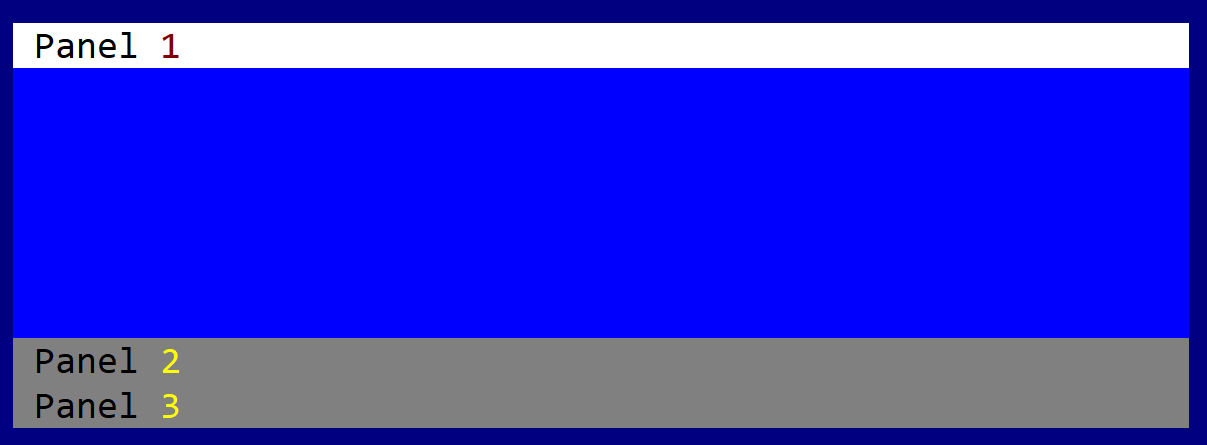
To create an accordion use Accordion::new methods:
let a1 = Accordion::new(layout!("a:c,w:15,h:10"),accordion::Flags::None);
or the macro accordion!
let a2 = accordion!("a:c,w:15,h:10,panels:[First,Second,Third]");
let a3 = accordion!("a:c,w:15,h:10,panels:[A,B,C],flags:TransparentBackground");
The caption of each accordion may contain the special character & that indicates that the next character is a hot-key. For example, constructing an accordion panel with the following caption &Start will set up the text of the accordion to Start and will set up character S as the hot key to activate that accordion panel.
An accordion supports all common parameters (as they are described in Instantiate via Macros section). Besides them, the following named parameters are also accepted:
| Parameter name | Type | Positional parameter | Purpose |
|---|---|---|---|
flags | List | No | Accordion initialization flags (available list include: TransparentBackground) |
panels | List | No | A list of accordion panels |
An accordion supports the following initialization flags:
accordion::Flags::TransparentBackgroundorTransparentBackground(for macro initialization) - this will not draw the background of the accordion
Some examples that uses these paramateres:
let t1 = accordion!("panels:[Tab1,Tab2,Accordion&3],d:f");
let t2 = accordion!("panels:[A,B,C],flags:TransparentBackground,d:f");
Events
To intercept events from an accordion, the following trait has to be implemented to the Window that processes the event loop:
pub trait AccordionEvents {
    fn on_panel_changed(&mut self, handle: Handle<Accordion>,
                                   new_panel_index: u32,
                                   old_panel_index: u32) -> EventProcessStatus
    {
        // This method is called when the current panel of the accordion is changed.
        // The `handle` parameter is the handle of the accordion control.
        EventProcessStatus::Ignored
    }
}
Methods
Besides the Common methods for all Controls, an accordion also has the following additional methods:
| Method | Purpose |
|---|---|
add_panel(...) | Adds a new accordion panel |
add(...) | Add a new control into the accordion (the index of the accordion where the control has to be added must be provided) |
current_panel() | Provides the index of the current accordion panel |
set_current_panel(...) | Sets the current accordion panel (this method will also change the focus to the accordion cotrol) |
panel_caption(...) | Returns the caption (name) of an accordion panel based on its index |
set_panel_caption(...) | Sets the caption (name) of an accordion panel |
Key association
The following keys are processed by an Accordion control if it has focus:
| Key | Purpose |
|---|---|
Ctrl+Tab | Select the next accordion. If the current accordion is the last one, the first one will be selected. |
Ctrl+Shift+Tab | Select the previous accordion. If the current accordion is the first one, the last one will be selected |
Additionally, Alt+letter or number will automatically select the accordion with that particular hotkey combination.
Example
The following code creates an accordion with 3 panels and adds two buttons on each accordion panel.
use appcui::prelude::*;


fn main() -> Result<(), appcui::system::Error> {
    App::new()
        .window(|| {
            let mut w = window!("Test,d:f");
            let mut t = accordion!("l:1,t:1,r:1,b:3,panels:['Panel &1','Panel &2','Panel &3']");
            t.add(0, button!("T1-1-A,r:1,b:0,w:10,type:flat"));
            t.add(0, button!("T1-1-B,a:c,w:10,type:flat"));
            t.add(1, button!("T1-2-A,r:1,b:0,w:14,type:flat"));
            t.add(1, button!("T1-2-B,a:c,w:14,type:flat"));
            t.add(2, button!("T1-3-A,r:1,b:0,w:20,type:flat"));
            t.add(2, button!("T1-3-B,d:l,w:20,type:flat"));
            w.add(t);

            w.add(button!("OK,r:0,b:0,w:10, type: flat"));
            w.add(button!("Cancel,r:12,b:0,w:10, type: flat"));
            w
        })
        .run()
}