Sub Menus
A sub menu item is a container for another menu.
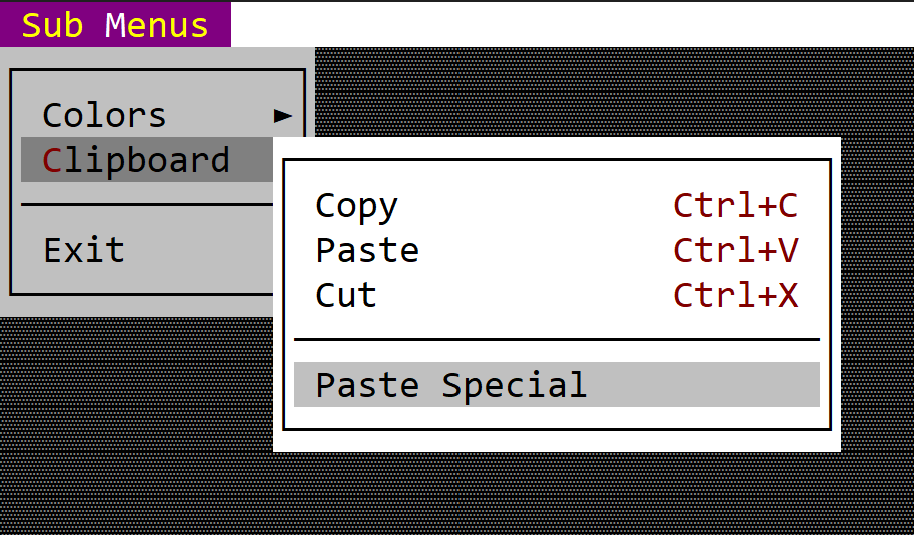
You can create it using either menu::SubMenu::new(...) method or via the menuitem! macro.
let submenu = menu::SubMenu::new("&Content", Menu::new());
or
let submenu = menuitem!("Content,items=[...]");
or
let submenu = menuitem!("Content,class:<class-name>,items=[...]");
Macro build
The following parameters are accepted by menuitem! when building a command menu item:
| Parameter name | Type | Positional parameter | Purpose |
|---|---|---|---|
text or caption | String | Yes (first positional parameter) | The caption (text) of the submenu. If the caption contains the special character &, the next character after it acts as a shortcut (meaning that pressing that character while that menu is open is equivalent to clicking that item). |
type | String | No | The type of the item (for a submenu item, if this field is specified, its value must be submenu). |
class | String | No | The name of the class where the menu is being implemented |
enable or enabled | Bool | No | Use this to disable or enable a menu item |
Remarks: Using the class attribute in a submenu will inherit that attribute for all subitems and submenus. See Build a menu with macros for more details.
Events
There are no command based events associated with a sub-menu. When clicked (or the Enter key is being pressed) the sub-menu will open and on_menu_open will be called (if needed to change the status of some of the sub-menu items):
trait MenuEvents {
    fn on_menu_open(&self, menu: &mut Menu) {
        // called whenever a menu is being opened
        // by AppCUI framework
        // This method can be used to change
        // certain menu-related aspects, such as
        // - enable/disable menu items
        // - add new items
    }
Methods
The following methods are available for a menu::SubMenu object:
| Method | Purpose |
|---|---|
set_caption(...) | Set the new caption for the item. If the string provided contains the special character &, this method also sets the hotkey associated with an item. If the string provided does not contain the & character, this method will clear the current hotkey (if any). |
caption() | Returns the current caption of an item |
set_enabled(...) | Enables or disables current item |
is_enabled() | true if the item is enabled, false otherwise |
Example
The following code creates a menu with submenus using the AppBar approach (recommended):
use appcui::prelude::*;

#[Window(events   = MenuEvents+AppBarEvents,
         commands = Red+Green+Blue+Copy+Paste+Cut+PasteSpecial+Exit)]
struct MyWin {
    main_menu: Handle<appbar::MenuButton>,
}
impl MyWin {
    fn new() -> Self {
        let mut w = MyWin {
            base: window!("Test,a:c,w:40,h:8"),
            main_menu: Handle::None,
        };

        // Create the main menu
        let mut main_menu = Menu::new();

        // Create colors submenu
        let mut colors_menu = Menu::new();
        colors_menu.add(menu::SingleChoice::new("&Red", Key::None, mywin::Commands::Red, true));
        colors_menu.add(menu::SingleChoice::new("&Green", Key::None, mywin::Commands::Green, false));
        colors_menu.add(menu::SingleChoice::new("&Blue", Key::None, mywin::Commands::Blue, false));
        main_menu.add(menu::SubMenu::new("&Colors", colors_menu));

        // Create clipboard submenu
        let mut clipboard_menu = Menu::new();
        clipboard_menu.add(menu::Command::new("&Copy", key!("Ctrl+C"), mywin::Commands::Copy));
        clipboard_menu.add(menu::Command::new("&Paste", key!("Ctrl+V"), mywin::Commands::Paste));
        clipboard_menu.add(menu::Command::new("Cu&t", key!("Ctrl+X"), mywin::Commands::Cut));
        clipboard_menu.add(menu::Separator::new());
        clipboard_menu.add(menu::Command::new("Paste &Special", Key::None, mywin::Commands::PasteSpecial));
        main_menu.add(menu::SubMenu::new("&Clipboard", clipboard_menu));

        main_menu.add(menu::Separator::new());
        main_menu.add(menu::Command::new("E&xit", key!("Alt+F4"), mywin::Commands::Exit));

        // Add to AppBar
        w.main_menu = w.appbar().add(
            appbar::MenuButton::new("&Actions", main_menu, 0, appbar::Side::Left)
        );

        w
    }
}

impl MenuEvents for MyWin {
    fn on_command(&mut self, menu: Handle<Menu>, item: Handle<menu::Command>, command: mywin::Commands) {
        match command {
            mywin::Commands::Copy => { /* Copy command was called */ }
            mywin::Commands::Paste => { /* Paster command was called */ },
            mywin::Commands::Cut => { /* Cut command was called */ },
            mywin::Commands::PasteSpecial => { /* PasteSpecial command was called */ },
            mywin::Commands::Exit => { /* Exit command was called */ },
            _ => {}
        }
    }

    fn on_select(&mut self, menu: Handle<Menu>, item: Handle<menu::SingleChoice>, command: mywin::Commands) {
        match command {
            mywin::Commands::Red => { /* Red color was selected */ }
            mywin::Commands::Green => { /* Green color was selected */ }
            mywin::Commands::Blue => { /* Blue color was selected */ }
            _ => {}
        }
    }
}

impl AppBarEvents for MyWin {
    fn on_update(&self, appbar: &mut AppBar) {
        appbar.show(self.main_menu);
    }
}

fn main() -> Result<(), appcui::system::Error> {
    App::new().app_bar().window(MyWin::new).run()
}