GraphView
Represents a graph visualization control that can display nodes and edges with various layout algorithms and interactive features. It also supports optional multi-selection (checkbox column and bulk shortcuts), mouse-driven creation of nodes (Ctrl+click on empty space) and edges (right-drag between nodes) via GraphViewEvents, and tooltips from GraphNode::write_description on hover.
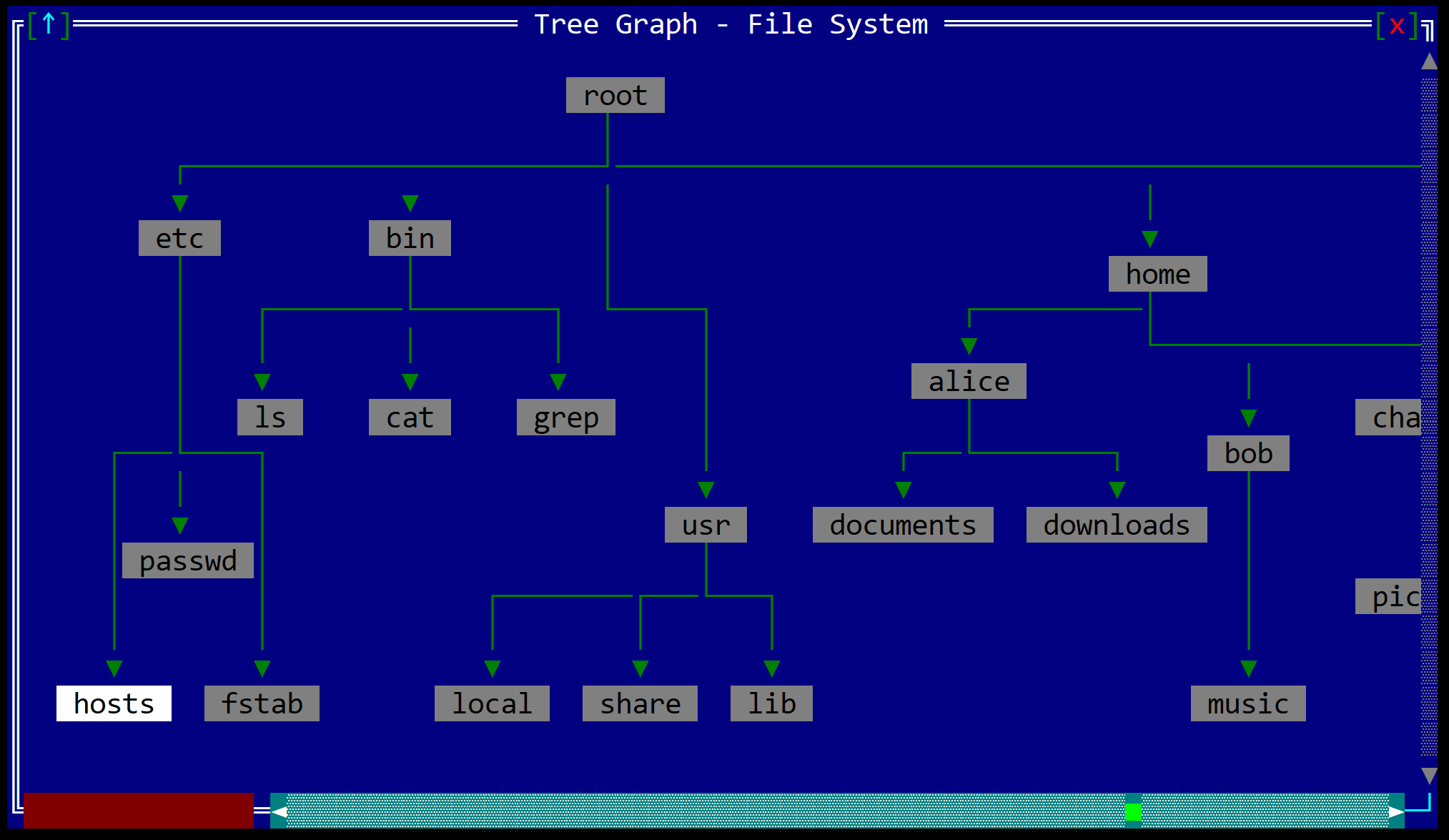
To create a GraphView use GraphView::new method (with 2 parameters: a layout and initialization flags).
let gv = GraphView::new(layout!("x:10,y:5,w:40,h:20"), graphview::Flags::ScrollBars | graphview::Flags::SearchBar);
or the macro graphview!
let gv1 = graphview!("x:10,y:5,w:40,h:20,flags:[ScrollBars,SearchBar]");
let gv2 = graphview!("d:f,arrange:GridPacked,routing:Orthogonal");
let gv3 = graphview!("d:f,flags:[ScrollBars,SearchBar,MultiSelect]");
A GraphView supports all common parameters (as they are described in Instantiate via Macros section). Besides them, the following named parameters are also accepted:
| Parameter name | Type | Positional parameter | Purpose |
|---|---|---|---|
flags | List | No | GraphView initialization flags |
background or back | Dict | No | Background character for the GraphView |
left-scroll-margin or lsm | Integer | No | Left margin for scrollbars/search components |
top-scroll-margin or tsm | Integer | No | Top margin for scrollbars/search components |
line-type or edge-line-type or elt | String | No | Line type for drawing edges |
routing or edge-routing | String | No | Edge routing algorithm |
arrange or arrange-nodes | String | No | Node arrangement algorithm |
arrow-heads or arrows | Bool | No | Enable/disable arrow heads on directed edges |
highlight-incoming-edges or hie | Bool | No | Highlight incoming edges of current node |
highlight-outgoing-edges or hoe | Bool | No | Highlight outgoing edges of current node |
A GraphView supports the following initialization flags:
graphview::Flags::ScrollBarsorScrollBars(for macro initialization) - enables scrollbars for navigating large graphs.graphview::Flags::SearchBarorSearchBar(for macro initialization) - enables a search bar for finding nodes.graphview::Flags::MultiSelectorMultiSelect(for macro initialization) - enables multi-selection UI: a checkbox gutter on each node (☑/☐), keyboard shortcuts to toggle or bulk-select nodes, and mouse gestures for Ctrl+click toggling and moving multiple selected nodes together. When this flag is off, behavior matches single-selection graphs as before.
A GraphView supports the following edge line types:
LineType::SingleorSingle- single line edgesLineType::DoubleorDouble- double line edgesLineType::SingleThickorSingleThick- thick single line edgesLineType::BorderorBorder- border style edgesLineType::AsciiorAscii- ASCII character edgesLineType::AsciiRoundorAsciiRound- ASCII rounded edgesLineType::SingleRoundorSingleRound- single rounded edgesLineType::BrailleorBraille- braille character edges
A GraphView supports the following edge routing algorithms:
graphview::EdgeRouting::DirectorDirect- draw edges as direct lines between nodesgraphview::EdgeRouting::OrthogonalorOrthogonal- draw edges as orthogonal lines (straight lines with right-angled corners) between attachment points on node rectangles. This usually produces a clearer layout than direct lines, especially on larger graphs.
A GraphView supports the following node arrangement algorithms:
graphview::ArrangeMethod::NoneorNone- no automatic arrangement (use custom positions)graphview::ArrangeMethod::GridorGrid- arrange nodes in a grid with spacinggraphview::ArrangeMethod::GridPackedorGridPacked- arrange nodes in a compact gridgraphview::ArrangeMethod::CircularorCircular- arrange nodes in a circlegraphview::ArrangeMethod::HierarchicalorHierarchical- arrange nodes hierarchically with spacinggraphview::ArrangeMethod::HierarchicalPackedorHierarchicalPacked- arrange nodes hierarchically, compactlygraphview::ArrangeMethod::ForceDirectedorForceDirected- use force-directed layout algorithm
Some examples that use these parameters:
let search_enabled = graphview!("x:0,y:0,w:50,h:30,flags:[SearchBar]");
let styled_graph = graphview!("d:f,line-type:Double,routing:Orthogonal,arrange:Circular,arrows:true");
let highlighted = graphview!("d:f,hie:true,hoe:true,back:{.,gray,black}");
Events
To intercept events from a GraphView, implement GraphViewEvents<T> on the window that runs the event loop. Every method has a default implementation that returns EventProcessStatus::Ignored, so you only override what you need.
pub trait GraphViewEvents<T> {
    fn on_current_node_changed(&mut self, handle: Handle<GraphView<T>>) -> EventProcessStatus;
    fn on_node_action(&mut self, handle: Handle<GraphView<T>>, node_index: usize) -> EventProcessStatus;
    // Ctrl+click on empty canvas — graph coordinates (see Mouse interaction).
    fn on_request_new_node(&mut self, handle: Handle<GraphView<T>>, point: Point) -> EventProcessStatus;
    // Right-drag finished on another node — zero-based indices as u32.
    fn on_request_new_edge(&mut self, handle: Handle<GraphView<T>>, from: u32, to: u32) -> EventProcessStatus;
    // MultiSelect only — selection set changed (user or modify_graph / set_selected).
    fn on_selection_changed(&mut self, handle: Handle<GraphView<T>>) -> EventProcessStatus;
}
Handle on_request_new_node / on_request_new_edge by calling GraphView::modify_graph to append nodes or edges, or ignore them if your graph is read-only.
Methods
Besides the Common methods for all Controls a GraphView also has the following additional methods:
| Method | Purpose |
|---|---|
set_graph(...) | Sets the graph data to be displayed. Takes a Graph<T> object containing nodes and edges. |
graph() | Returns a reference to the current graph data. |
set_background(...) | Sets the background character for the GraphView. |
clear_background() | Clears the background character, making it transparent. |
set_edge_routing(...) | Sets the edge routing algorithm (Direct or Orthogonal). |
set_edge_line_type(...) | Sets the line type used for drawing edges. |
enable_edge_highlighting(...) | Enables or disables highlighting of incoming and outgoing edges for the current node. Takes two boolean parameters: incoming and outgoing. |
enable_arrow_heads(...) | Enables or disables arrow heads on directed edges. |
arrange_nodes(...) | Applies a layout algorithm to arrange the nodes in the graph. Takes an ArrangeMethod parameter. |
modify_graph(...) | Runs a closure with an EditableGraph so you can add or remove nodes and edges, change the current selection, and edit node or edge properties; the control repaints and refreshes geometry when the closure reports changes. |
selected_count() | Returns how many nodes have selected == true (meaningful when MultiSelect is enabled). |
Building a Graph<T>
| Associated function | Purpose |
|---|---|
Graph::new(nodes, edges) | Takes owned Vec<Node<T>> and Vec<Edge>. Drops edges whose endpoints are not valid node indices, then rebuilds each node’s edges_in / edges_out lists. |
Graph::with_slices(nodes, edges, directed) | Clones each T into a default-styled node via NodeBuilder, then builds edges from (from, to) pairs with the same directed value on every edge. Requires T: Clone. |
Graph::with_slices_and_border(...) | Same as with_slices, but every node is created with the given LineType border. |
Graph::default() yields an empty graph (no nodes, no edges) with default internal buffers.
Reading a graph (graph())
The reference from graph() is &Graph<T>: read-only access to nodes, edges, and the current selection.
| Method | Purpose |
|---|---|
current_node() | Some(&Node<T>) for the focused node, or None when there are no nodes. |
node(index) | Some(&Node<T>) at the zero-based index, or None if out of range. |
nodes_count() | Number of nodes. |
In-place editing (modify_graph)
Call graph_view.modify_graph(|g| { ... }) so the closure receives an EditableGraph. The closure can call:
| Method | Purpose |
|---|---|
node(index) | Some(EditableNode) to read or change bounds, position, size, label alignment, text attribute, or border for that node. |
nodes_count(), add_node, delete_node | Inspect size, append a built Node<T>, or remove a node (incident edges removed; remaining edge endpoints renumbered). |
edge(index) | Some(EditableEdge) to read or change per-edge line type and character attribute. |
edges_count(), add_edge, delete_edge | Edge list maintenance; add_edge returns false if endpoints are invalid. |
set_current_node, current_node | Update or read the selection index tracked for this edit (applied to the inner Graph when the closure finishes). |
After the closure returns, the control updates edge connectivity, may resize the backing surface, and repaints if anything changed. If MultiSelect is enabled and the closure changes any node’s multi-selection state (set_selected), on_selection_changed may be dispatched after the closure returns.
graph_view.modify_graph(|g| {
    if let Some(mut n) = g.node(0) {
        n.set_value("Updated");
    }
});
Node and EditableNode
On a read-only Node<T> from graph().node(i) or graph().current_node():
| Method | Purpose |
|---|---|
value() | Reference to the user payload T (your GraphNode type). |
is_selected() | Whether the node is in the multi-selection set. Meaningful when the GraphView was created with Flags::MultiSelect; otherwise this flag is not used by the control. |
Inside modify_graph, EditableNode also exposes layout and style APIs, for example bounds / set_bounds, position / set_position, size / set_size, value / value_mut / set_value, text alignment and attribute get/set/clear, border get/set/clear, and set_selected / is_selected for the multi-selection checkbox state. Most setters flip an internal “changed” flag so the graph view knows to repaint; value_mut does not set that flag by itself.
EditableEdge
Inside modify_graph, EditableEdge exposes from_node_id, to_node_id, and directed (read-only), plus attribute / set_attribute and line_type / set_line_type for styling overrides.
Key association
The following keys are processed by a GraphView control if it has focus:
| Key | Purpose |
|---|---|
Arrow Keys | Navigate between nodes in the specified direction (finds the closest node in that direction). |
Ctrl+Arrow Keys | Without MultiSelect: move the current node by one cell. With MultiSelect: move every selected node by one cell in that direction; if that moves nothing, falls back to nudging the current node (same as non–multi-select). |
Space | When MultiSelect is enabled: toggle whether the current node is in the selection set (same effect as a short Ctrl+click on that node). Ignored if multi-select UI is off or the graph is empty. |
Ctrl+A | When MultiSelect is enabled: if every visible (non–search-filtered) node is selected, clear selection on those nodes; otherwise select all visible nodes. Moves the current node to the first visible node. Ignored if multi-select UI is off or the graph is empty. |
Enter | Triggers a node action event (on_node_action) for the current node. |
Ctrl+Tab | Move to the next node in the graph (by index). |
Ctrl+Shift+Tab | Move to the previous node in the graph (by index). |
Alt+Arrow Keys | Scroll the view in the specified direction (when scrollbars are enabled). |
Page Up/Page Down | Scroll the view up or down by one page. |
Home | Scroll to the top-left of the graph. |
End | Scroll to the bottom-right of the graph. |
Escape | Clear search text (if search bar is active), or exit search mode. |
Enter (in search) | Go to next matching node. |
Ctrl+Enter (in search) | Go to previous matching node. |
Mouse interaction
The GraphView supports various mouse interactions:
- Click (left) on a node: Sets that node as current. With
MultiSelect, a normal click also clears other selected nodes and selects only this one, then begins a drag if you keep the button down (see below). - Ctrl+click (left) on a node (
MultiSelectonly): If you release without moving more than a few pixels, toggles that node’s inclusion in the selection set and raiseson_selection_changedwhen the set changes. If you drag past the threshold, behaves like dragging the selection (see Drag nodes). - Double-click (left) on a node: Triggers
on_node_actionfor that node. - Drag nodes: Press on a node and drag to move it. With
MultiSelect, all selected nodes move together when you drag from a selected node; dragging from an unselected node moves only that node (and selects it on press, unless Ctrl+click mode applies). - Click / drag empty graph area (left): Dragging pans the view (same as before). Releasing after a click with no movement clears the multi-selection set (
MultiSelectonly). Ctrl+click on empty space raiseson_request_new_nodewith the graph-spacePointunder the cursor so you can create a node at that position. - Right button — new edge: Press right on a node and drag; a preview line follows the pointer. Release right on a different node to raise
on_request_new_edge(from, to)with zero-based indices asu32. Releasing elsewhere cancels. Moving the mouse out of the control or losing focus clears the preview. - Mouse wheel: Scrolls the view (including horizontal where supported).
- Hover: Updates hover highlighting; if
GraphNode::write_descriptionreturns non-empty text, it is shown as a tooltip over the node rectangle.
Graph item
A GraphView can display a graph data structure. The graph data structure is a collection of nodes and edges. Each node can contain a data object of type T that must implement the GraphNode trait.
pub trait GraphNode {
    fn write_label(&self, f: &mut dyn std::fmt::Write, size: Size) -> std::fmt::Result;
    fn write_description(&self, f: &mut dyn std::fmt::Write) -> std::fmt::Result {
        Ok(())
    }
    fn prefered_size(&self) -> Size;
}
where:
write_labelis used to write the label of the node to the formatter (this method is required and must be implemented by the data object)write_descriptionis used to write the description of the node. The default implementation writes nothing; if you override it, the text can be shown as a tooltip when the user hovers over the node.prefered_sizeis used to get the preferred size of the node. This method is being used when a graph is provided without an explicit size for a node.
Remarks: By default, the GraphNode trait is implemented for the following types:
&strStringu8,u16,u32,u64,usizei8,i16,i32,i64,isize
Creating a graph
A graph can be created in several ways:
- Using the
Graph::newmethod (a vector of nodes and a vector of edges; invalid edges are removed as described above)let graph = Graph::new(nodes, edges); - Using the
Graph::with_slicesmethod (and providing slices of nodes and edges)let graph = Graph::with_slices(nodes, edges, directed); - Using the
Graph::with_slices_and_bordermethod (and providing slices of nodes and edges, and a border type)let graph = Graph::with_slices_and_border(nodes, edges, border, directed);
To create a node (that will further be used in the graph) you can use the NodeBuilder struct.
let node = NodeBuilder::new(node_data).build();
with the following builder methods:
size- the size of the node (if not provided, the preferred size as it is returned by theGraphNodeimplementation will be used)position- the position of the node (if not provided, the node will be placed at the top-left corner of the graph)border- the border type for the node (if not provided, no border will be drawn)text_alignment- the text alignment for the node (if not provided, the text will be centered)text_attribute- the text attribute for the node (if not provided, the text will be displayed in the default attribute extracted from the terminal theme)
Similarly, to create an edge (that will further be used in the graph) you can use the EdgeBuilder struct.
let edge = EdgeBuilder::new(from, to).build();
with the following builder methods:
directed- if the edge is directed (with an arrow) or not (if not provided, the edge will be undirected)attribute- the attribute for the edge (if not provided, the edge will be displayed in the default attribute extracted from the terminal theme)line_type- the line type for the edge (if not provided, the default line type will be used)
When building an edge, the from and to parameters are the indices of the nodes in the graph. For example, in a graph with 5 nodes, the edge from node 2 to node 4 will be created with EdgeBuilder::new(2, 4).build() (indices are zero-based).
Some examples on how to create a graph:
- A simple graph with 5 nodes and 4 edges (using slices):
let graph = Graph::with_slices( &["A", "B", "C", "D", "E"], // nodes (of type &str) &[(0, 1), (0, 2), (1, 3), (2, 4)], // edges between nodes true // directed edges ); - A graph with a border around each node:
let graph = Graph::with_slices_and_border( &["A", "B", "C", "D", "E"], // nodes (of type &str) &[(0, 1), (0, 2), (1, 3), (2, 4)], // edges between nodes LineType::Double, // border type true // directed edges ); - A more complex graph where each node is created manually:
let nodes = vec![
     NodeBuilder::new("A").size(Size::new(10, 1)).build(),
     NodeBuilder::new("B").build(),
     NodeBuilder::new("C").text_alignment(TextAlignment::Left).build(),
     NodeBuilder::new("D").text_alignment(TextAlignment::Right).build(),
     NodeBuilder::new("E").border(LineType::Ascii).build(),
 ];
 let edges = vec![
     EdgeBuilder::new(0, 1).build(),
     EdgeBuilder::new(0, 2).build(),
     EdgeBuilder::new(1, 3).build(),
     EdgeBuilder::new(2, 4).build(),
 ];
 let graph = Graph::new(nodes, edges);
Example
The following code creates a window with a GraphView displaying a simple hierarchy. When nodes are selected or activated, the window title updates to show the current action. The other GraphViewEvents methods (on_request_new_node, on_request_new_edge, on_selection_changed) are left at their default implementations here.
For a full editor sample (app bar, modify_graph, MultiSelect, and handlers for new node/edge and selection), see the examples/graph_editor example in the AppCUI-rs repository.
use appcui::prelude::*;

type NodeValue = &'static str;

#[Window(events = GraphViewEvents<NodeValue>)]
struct MyWin {
    graph_view: Handle<GraphView<NodeValue>>,
}
impl MyWin {
    fn new() -> Self {
        let mut win = MyWin {
            base: Window::new("Graph Demo", layout!("d:f"), window::Flags::None),
            graph_view: Handle::None,
        };

        // Create a simple graph
        let nodes = &["Root", "Child 1", "Child 2", "Grandchild"];
        let edges = &[(0, 1), (0, 2), (1, 3)];
        let graph = graphview::Graph::with_slices(nodes, edges, true);

        // Create and configure the GraphView
        let mut gv = graphview!("d:f,arrange:Grid,routing:Orthogonal,arrows:true,flags:[ScrollBars,SearchBar],hie:true");
        gv.set_graph(graph);

        win.graph_view = win.add(gv);
        win
    }
}
impl GraphViewEvents<NodeValue> for MyWin {
    fn on_current_node_changed(&mut self, handle: Handle<GraphView<&'static str>>) -> EventProcessStatus {
        if let Some(gv) = self.control(handle) {
            if let Some(node) = gv.graph().current_node() {
                let title = format!("Graph Demo - Selected: {}", node.value());
                self.set_title(&title);
            }
        }
        EventProcessStatus::Processed
    }

    fn on_node_action(&mut self, handle: Handle<GraphView<&'static str>>, node_index: usize) -> EventProcessStatus {
        if let Some(gv) = self.control(handle) {
            if let Some(node) = gv.graph().node(node_index) {
                let title = format!("Graph Demo - Action on: {}", node.value());
                self.set_title(&title);
            }
        }
        EventProcessStatus::Processed
    }
}


fn main() -> Result<(), appcui::system::Error> {
    App::new().window(MyWin::new).run()
}