MenuButton
A menu button is a button that opens a menu when clicked. Once the menu is opened, moving the mouse over another menu button or using the keyboard to move to another menu button will close the current menu and open the new one automatically.
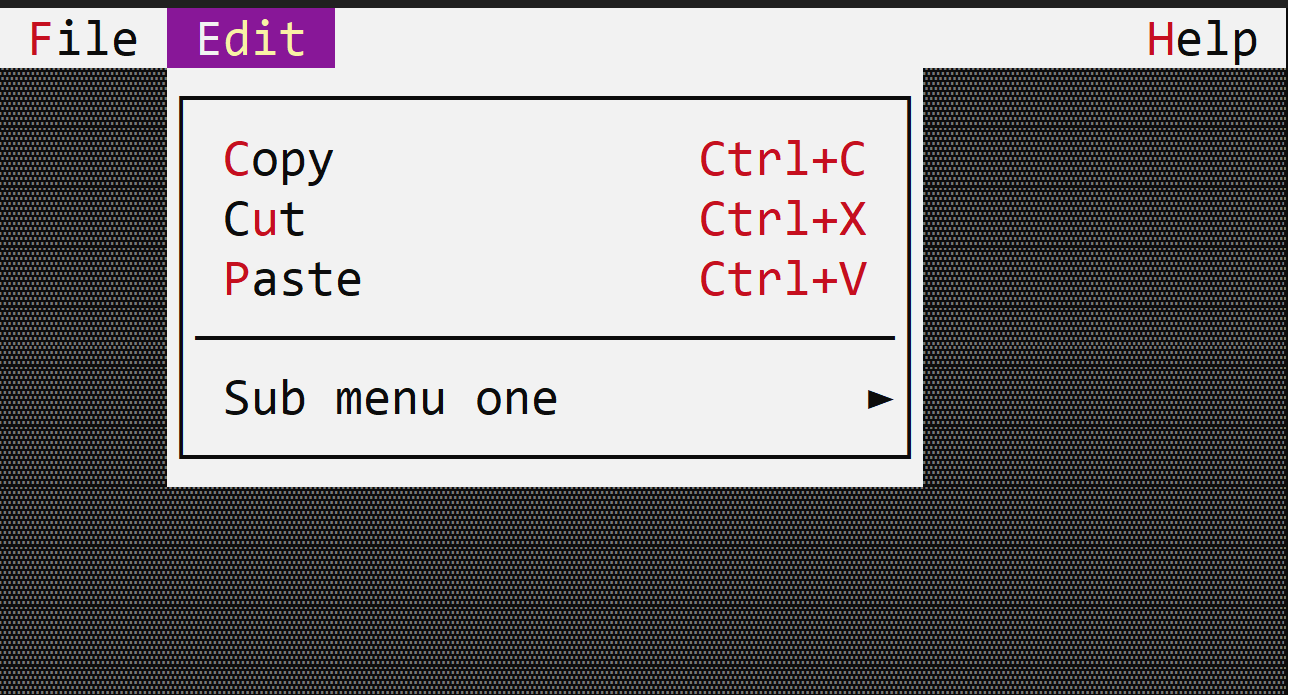
To create a menu button, use the appbar::MenuButton::new(...) method or the appbar::MenuButton::with_handle(...) method.
let m = appbar::MenuButton::new("&File",
                                menu!(...),
                                0, // order
                                appbar::Side::Left);
or
let menu = menu!(....);
let menu_handle = self.register_menu(menu);
let m = appbar::MenuButton::with_handle("&File",
                                        menu_handle,
                                        0, // order
                                        appbar::Side::Left);
The caption of a menu button may contain the special character & that indicates that the next character is a hot-key. For example, constructing a menu button with the following caption &File will set up the text of the button to File and will set up character F as the hot key for that button (pressing Alt+F will open the menu).
Events
A menu button does not have an associated method in the AppBarEvents trait. However, once opened, any events generated by the menu can be received via the MenuEvents trait.
Methods
The following methods are available for a menu button:
| Method | Purpose |
|---|---|
set_caption(...) | Set the new caption for a menu button. If the string provided contains the special character &, this method also sets the hotkey associated with a control. If the string provided does not contain the & character, this method will clear the current hotkey (if any).Example: menu_button.set_caption("&File") — this sets the caption of the menu button to File and the hotkey to Alt+F. |
caption() | Returns the current caption of a menu button |
set_enabled(...) | Enables or disables the menu button |
is_enabled() | Returns true if the menu button is enabled, false otherwise |
Example
The following example creates 3 menu buttons (File, Edit and Help) and adds them to the app bar.
File and Edit are on the left side of the app bar, while Help is on the right side.
The window implements:
AppBarEvents- to select what menu button will be visible in the app bar when the window has focusMenuEvents- to receive the commands from the menus if opened
use appcui::prelude::*;

#[Window(events = [AppBarEvents, MenuEvents],
         commands=[New,Save,SaveAs,Open,Exit,Copy,Cut,Paste,Time,Date,Convert,About,Welcome])]
pub(crate) struct Win {
    h_file: Handle<appbar::MenuButton>,
    h_edit: Handle<appbar::MenuButton>,
    h_help: Handle<appbar::MenuButton>,
}

impl Win {
    pub(crate) fn new() -> Self {
        let mut w = Win {
            base: window!("'Menu Buttons',a:c,w:40,h:8,Flags: Sizeable"),
            h_file: Handle::None,
            h_edit: Handle::None,
            h_help: Handle::None,
        };

        // File menu
        let m = menu!(
            "class: Win, items=[
                { &New, cmd: New , key: Ctrl+N },
                { &Save, cmd: Save, key: Ctrl+S },
                { 'Save &as...', cmd: SaveAs },
                { &Open, cmd: Open, key: Ctrl+O },
                { --- },
                { E&xit, cmd: Exit, key: Alt+F4 },
            ]"
        );
        w.h_file = w.appbar().add(appbar::MenuButton::new("&File", m, 1, appbar::Side::Left));

        // Edit menu
        let m = menu!(
            "class: Win, items=[
                { &Copy, cmd: Copy , key: Ctrl+C },
                { C&ut, cmd: Cut, key: Ctrl+X },
                { &Paste, cmd: Paste, key: Ctrl+V },
                { --- },
                { 'Sub menu one', items = [
                      { &Time, cmd: Time, Key: F1 },
                      { &Date, cmd: Date, Key: F2 },
                      { &Convert, items = [
                           { 'From milliseconds', cmd: Convert, key: Ctrl+1 },
                           { 'From seconds', cmd: Convert, key: Ctrl+2 },
                        ]
                       }
                   ]
                }
            ]"
        );
        w.h_edit = w.appbar().add(appbar::MenuButton::new("&Edit", m, 1, appbar::Side::Left));

        // Help menu
        let m = menu!(
            "class: Win, items=[
                { &About, cmd: About },
                { Welcome, cmd: Welcome },
            ]"
        );
        w.h_help = w.appbar().add(appbar::MenuButton::new("&Help", m, 1, appbar::Side::Right));

        w
    }
}
impl AppBarEvents for Win {
    fn on_update(&self, appbar: &mut AppBar) {
        // order will be File, Edit, Help (on the right)
        appbar.show(self.h_file);
        appbar.show(self.h_edit);
        appbar.show(self.h_help);
    }
}
impl MenuEvents for Win {
    fn on_command(&mut self, _menu:Handle<Menu>, _item:Handle<menu::Command>, command:win::Commands){
        match command {
            win::Commands::New => { /* Handle New command */ },
            win::Commands::Save => { /* Handle Save command */ },
            win::Commands::SaveAs => { /* Handle SaveAs command */ },
            win::Commands::Open => { /* Handle Open command */ },
            win::Commands::Exit => { /* Handle Exit command */ },
            win::Commands::Copy => { /* Handle Copy command */ },
            win::Commands::Cut => { /* Handle Cut command */ },
            win::Commands::Paste => { /* Handle Paste command */ },
            win::Commands::Time => { /* Handle Time command */ },
            win::Commands::Date => { /* Handle Date command */ },
            win::Commands::Convert => { /* Handle Convert command */ },
            win::Commands::About => { /* Handle About command */ },
            win::Commands::Welcome => { /* Handle Welcome command */ },
        }
    }
}


fn main() -> Result<(), appcui::system::Error> {
    App::new().app_bar().window(Win::new).run()
}